Kadosh Bot Enterprise
Your automated trading desk — audited, guarded, and honest about the numbers
Nine automated trading bots inside the Kadosh Command Center desktop app, trading Nasdaq and Micro Gold futures on your Topstep account. Practice, Evaluation, and Funded accounts all supported — you choose your size and risk, the app shows you exactly what that choice means in dollars, and a guard stack watches every order. Every published number carries its measurement window.
Validated, then shipped — in that order
The flagship strategy trades Nasdaq and Micro Gold with broker-side protective brackets on every position. Its recipe ships encrypted and is never published — what IS published is the audit: a full measured year, honest two-side costs, and a 10,000-run Monte Carlo behind every statistic on this site. Numbers without a measurement window are marketing; ours have windows.
Nine bots, one account
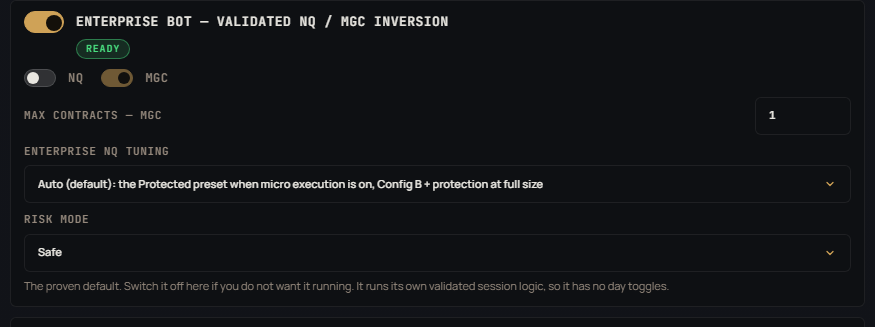
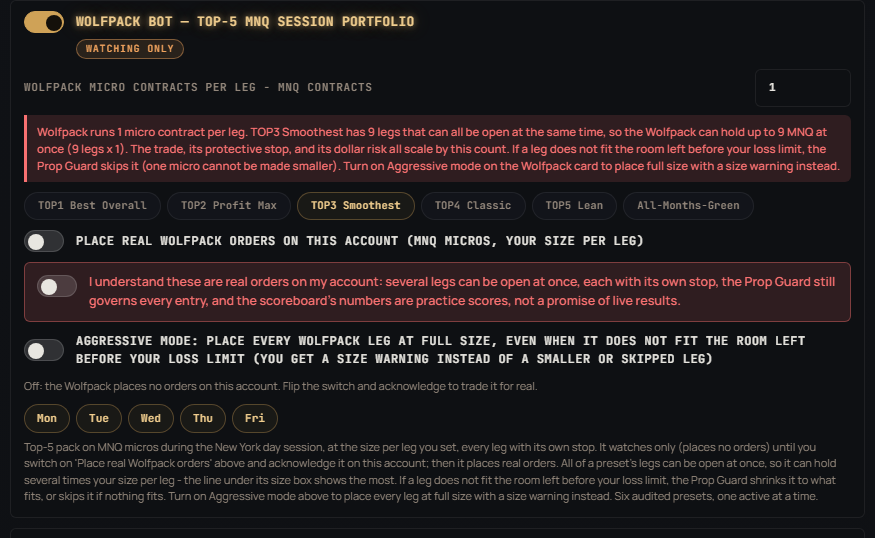
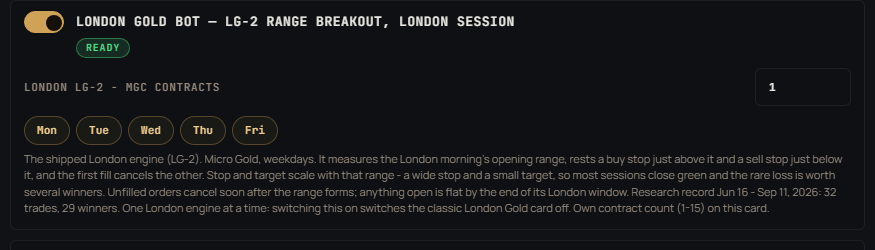
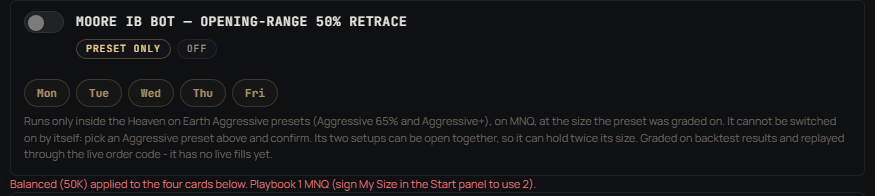
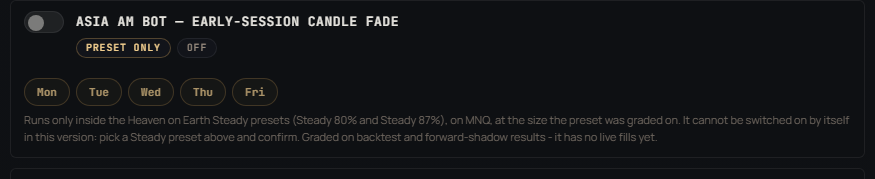
Enterprise Bot (the validated NQ / Micro Gold flagship), Playbook Bot (Nasdaq sweeps plus a braked gold card), NY AM Bot (the 9:30 ET open, on MNQ micros by default), Asia Reversal Bot (the Tokyo evening), London Gold Bot — LG-2 (the London opening-range breakout on Micro Gold, new 2026-09-13), the original London Gold engine (still selectable), the Wolfpack (five champion session legs on MNQ micros, real orders once you switch them on and acknowledge them), and - since October 2026 - the Asia AM Bot (an early-morning candle fade) and the Moore IB Bot (an opening-range retrace), which run only inside the Heaven on Earth presets that were graded with them. Since v1.9.66 the NQ bots each pick NQ or MNQ micros and carry their own size, and since v1.9.67 every routed order lands on that chosen contract. Enable any mix — they share one account, one loss budget, and one guard stack, a one-position-per-market lock keeps them out of each other's lane, and the app tells you plainly what stacking them means.
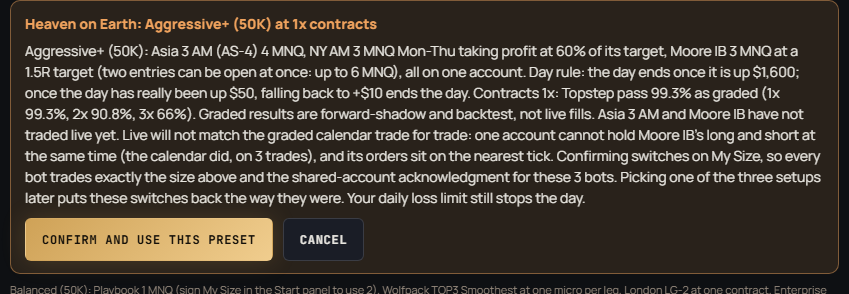
New in v1.10.1 – v1.10.3 (October 2026) — Heaven on Earth presets. Five one-click presets for a 50K account, each graded May 27 – Sep 25, 2026 over stored bars with the shipped engines (not live fills): Green-day lock (Asia, NY AM and the Wolfpack taking turns by the hour), Steady 80% and Steady 87% (the new Asia AM bot with NY AM), Aggressive 65% and Aggressive+ (the new Moore IB bot with NY AM, plus Asia or Asia AM). One confirm sets every card exactly as graded and switches on My Size, the shared-account box and, where the preset runs it, the Wolfpack's real orders; an account-wide day rule can end the day early. The Asia AM and Moore IB bots run only inside their presets, and neither has traded live yet — the app says so before you confirm, and live results will not match the graded calendar trade for trade. Changing a card by hand never locks you out: the preset switches itself off and says so, and a Preset off button leaves one on purpose (v1.10.2). Also since September: updates are signed by Kadosh and unsigned updates are refused (v1.9.90); the strategy files open only for an active licence our server has confirmed, and the first Start asks you to read and agree to the Terms, Privacy Policy and Risk Disclosure — one tick, once (v1.10.1). The graded numbers for every preset are on the Stats page.
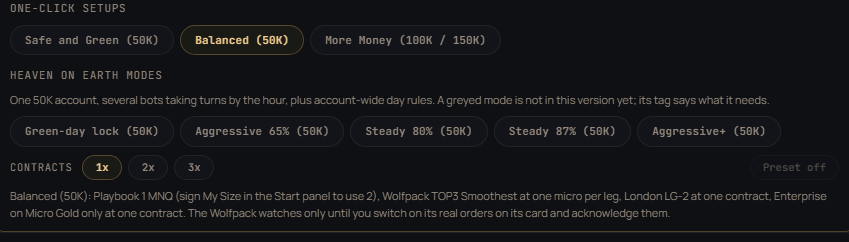
v1.9.70 — one-click setups. Three chips at the top of the Bots panel set four cards at once: the Playbook on MNQ micros, the Wolfpack at one micro per leg, London LG-2 at one contract and the Enterprise Bot on Micro Gold only at one contract. The three stacks were measured together over the same 64 sessions (Jun 16 – Sep 11, 2026; research ledgers at one unit each, not live fills): Safe and Green (50K) $9,253, 70% green sessions, deepest dip $614 · Balanced (50K) $13,936, 73% green sessions, deepest dip $1,348 · More Money (100K / 150K) $16,755, 70% green sessions, deepest dip $1,378. The bots do not lose on the same days, which is why the stack is green more often than any one bot. A chip never touches an acknowledgment: the Wolfpack’s real-order switch and My Size stay yours.
v1.9.83 – v1.9.84 (September 21, 2026). NY AM and Asia now arm on their exact start second instead of waiting up to 20 seconds for the next heartbeat. If Topstep refuses an entry because price already moved past it, the bot now enters at market — the way the backtest fills that trade — instead of losing the day; a Playbook stop refused the same way is moved to the real stop from your fill, and the trade is closed only if that is passed too. If a close fails at the end of a session, the trade keeps a stop and the bot retries every cycle, and its card says so. The loss guard ignores old prices, so frozen data can no longer fake a lockout or hide a loss. The Topstep login renews itself. Funded (XFA) accounts are read correctly, a wrong PC clock or a lost licence-server link is explained in plain words, and an update cut off by a power loss asks you to reinstall instead of being treated as tampering. New installs start NY AM, Asia and the Playbook on MNQ micros (a saved NQ stays NQ), and the Enterprise Nasdaq leg defaults to Auto, which picks the tuning measured for your contract size.
Pick a measured preset — or pick My Size
The Trade Size panel shows measured presets (1, 2, or 3 contracts with their audited monthly estimate, pass odds, and account-blow risk) — or choose My Size and set your own contracts and risk mode. Your choice runs, on any account type, after one plain-English acknowledgment that spells out the dollars. Your size applies to each market separately: 3 contracts with both markets on means 3 × NQ and 3 × MGC. The only trade the bot will ever refuse at any setting is one whose stop loss alone would end your account.
| Account | Size | Max Loss Limit | Status |
|---|---|---|---|
| Topstep Practice | any | your custom lockout | Fully supported |
| Topstep Evaluation / Combine | $50K / $100K / $150K | $2,000 / $3,000 / $4,500 | Fully supported |
| Topstep Funded (Express) | $50K / $100K / $150K | $2,000 / $3,000 / $4,500 | Fully supported |
| Lucid (Rithmic) | — | — | Not supported yet (Topstep only today) |
Same bot, same trades, same guards on every supported account type — your chosen size runs everywhere it can survive the firm's Max Loss rule. The app connects to Topstep (TopstepX) today.
A Windows desktop app that installs in minutes, activates with your Discord purchase, and updates itself. No servers to rent, no code to touch.
Step 1 — Pick a one-click setup, or your own mix
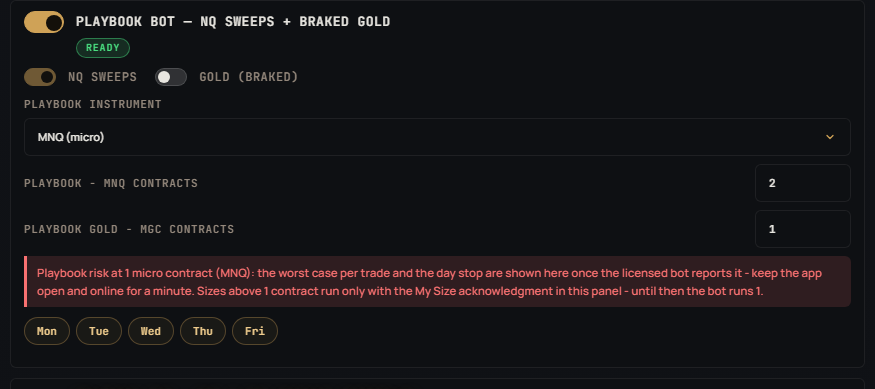
The Bots panel opens with two rows of one-click choices. The Heaven on Earth row holds the five graded presets — pick one and confirm, and every card is set exactly as graded, with the contracts toggle (1x, 2x, 3x) and a Preset off button beside it. Under it, three one-click setup chips — Safe and Green, Balanced, More Money — set four cards at once, each measured over the same 64 sessions. Or switch bots on one by one: the counter shows how many are live, and if you stack more than one, the app spells out the combined worst-case in dollars before you acknowledge it. The day buttons under each bot pick its trading days; leave them alone and the audited defaults run. A one-position-per-market lock referees the bots automatically — two engines can never fight over the same market. Since v1.9.12 the flagship and Playbook each get their own NQ / Gold market switches, so you can run any combination — Nasdaq-only, gold-only, or both per engine — and Playbook gets its own contract-size field, capped to your account’s limits automatically. An Overlap option (two engines sharing one market) is visible in the app but held until it passes the money-path audit — we don’t ship what we haven’t proven.

Step 2 — Every bot has its own card: instrument, size, presets, days
Since September each bot carries its own settings on its card. The Playbook picks NQ or MNQ micros and its own count; the Wolfpack picks one of six audited presets and has its own real-order switch; London LG-2 has its own contract count. The two preset-only bots (Asia AM, Moore IB) show a Preset only badge: their switch cannot be turned on by hand, and their card says plainly that they have no live fills yet. Each card prices your choice in plain dollars, and sizes above the validated count run only after the My Size acknowledgment in the Start panel — the guards and the account cap still apply to whatever you type.
Step 3 — Press Start; the plan tells you exactly what will trade
The Start panel lists every bot with what it will do — contract, count, live or watching — and the acknowledgments that apply. One button. The app saves your settings, runs its safety checks, and the bots begin their sessions. Every trade goes in with its protective stop and target resting at the broker — so your protection lives even if your computer doesn’t. Press Stop any time; the day bots go home flat by 3:55 PM ET regardless, and each session bot is flat by the end of its own session.
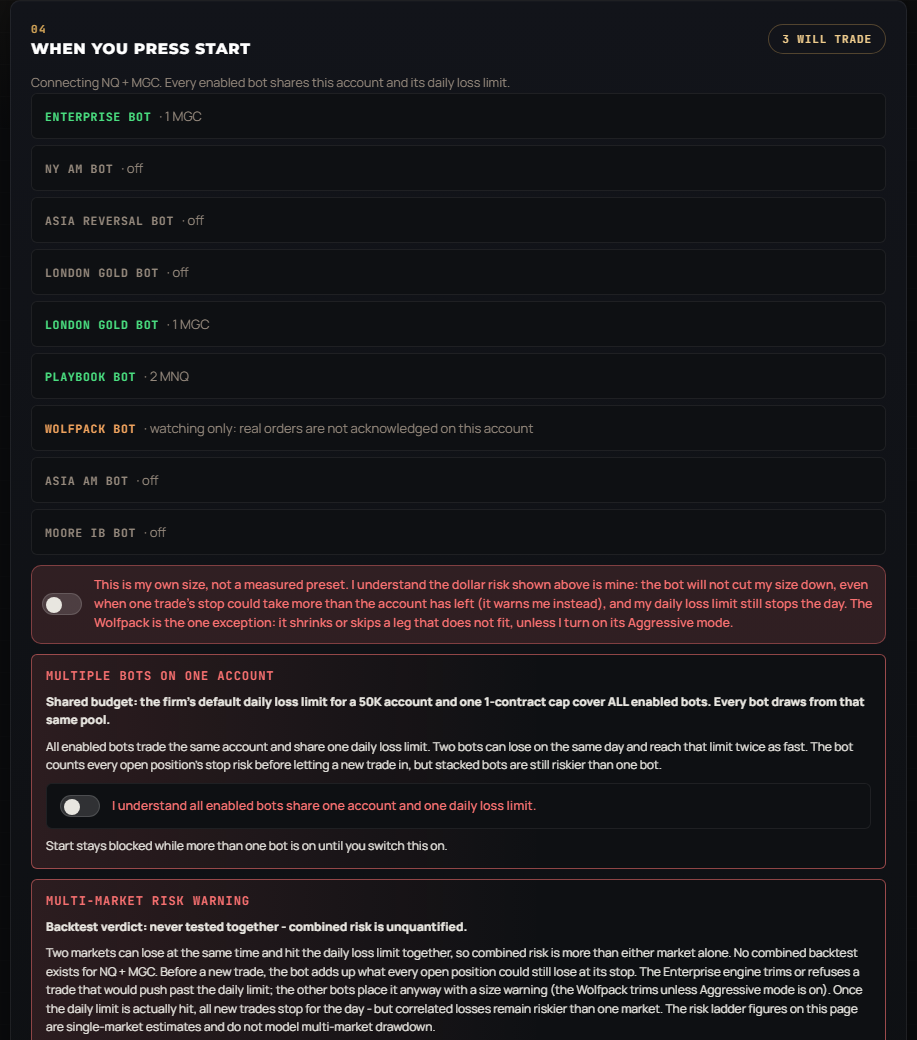
Screens captured 2026-10-05 from the v1.10.3 build in a test profile (no account connected), with the Balanced setup applied.
Real prop firm rules, real account limits — and honest audited economics. Re-baselined 2026-08-10: monthly figures come from the audited year and its 10,000-run Monte Carlo; pass odds come from a 10,000-path eval simulation through real firm rules. Estimates, not promises — roughly 1 year in 7 loses money even when the bot performs as designed.
Configure accounts
If you already passed evals, you skip the waiting period. Here's your timeline from your current starting point:
| You have | Next step | First payout | Path to $10K/mo |
|---|---|---|---|
| 1 funded | 5 winning days → request payout | 2-4 weeks | Add 5-7 more evals (2-3 months) |
| 3 funded | Start payout cycle on each | 1-2 weeks | Add 3-5 more evals (1-2 months) |
| 5 funded (1 firm) | Max at this firm, add 2nd firm | This cycle | Add 3-5 Lucid accounts (1 month) |
| 5 TS + 5 Lucid | All funded, payouts running | Now | You're there — $10K+/mo |
Trading futures involves substantial risk of loss and is not suitable for all investors. Past performance, whether actual or indicated by simulations and backtests, is not indicative of future results. No representation is being made that any account will achieve profits or losses similar to those shown. Monte Carlo simulations test statistical robustness but cannot predict market regime changes. The creator assumes no responsibility for trading losses. By purchasing this software, you acknowledge the risks and accept full responsibility for your trading decisions.
LICENSE: Personal use only. May not be resold, redistributed, or reverse-engineered without written permission.
TERMS: Paying for, installing or using Kadosh Bot Enterprise means you agree to the Terms of Service & Licence (all payments final, no resale, no tampering), the Privacy & Data Policy and the Risk Disclosure.
Seats are not sold openly. Every application is read and decided by hand, in weekly batches. Roughly six minutes — and there is a list of reasons I say no at the top of that page, so read it before you start.
See Member Results See Audited Stats & Scaling Lab Build My Desk Drawdown Calculator